
Many organisations have plenty of project information but still struggle to answer basic questions. Which projects are on track, which are at risk, and where should leadership intervene? Teams provide updates, but those updates are often inconsistent, subjective, and difficult to compare across a portfolio. This is where Power BI can add real value.
Power BI does not fix project management by itself. What it can do is transform project reporting from a collection of slides and spreadsheets into a consistent decision system. When the underlying data is structured and updated regularly, Power BI can help leaders see trends early, spot portfolio overload, and focus governance conversations on action rather than narration.
This article explains how to use Power BI for project management in a practical way. It covers the data model you need, the dashboards that create the most value, and the mistakes that cause project dashboards to become unused.
What project leaders actually want from reporting
Before building dashboards, clarify what your stakeholders need. In most organisations, leaders want to answer these questions quickly:
- What is our current project load, and how is it distributed across teams?
- Which projects are at risk, and why?
- Are risks improving or deteriorating over time?
- Where are we overloaded, and what will slip as a result?
- What decisions are required this week or month?
- Are we delivering the benefits we promised?
A dashboard that cannot support these questions becomes a vanity report. A dashboard that can support them becomes a management tool.
The foundation – you need consistent project data
The biggest misconception about project dashboards is that they are a visual problem. In reality, they are a data consistency problem. If project updates are inconsistent or subjective, Power BI will simply visualise inconsistency at scale.
Start with a minimum project data model. Keep it small and consistent. Most portfolios can benefit from these fields:
- project name
- project owner
- sponsor
- department or workstream
- category (for example, compliance, digital, operational improvement, customer)
- priority
- start date and target end date
- current stage (define, plan, execute, stabilise, review, or similar)
- status (green, amber, red) plus trend (improving, stable, deteriorating)
- status rationale (short written explanation)
- next milestone and date
- top risks or issues with owners and due dates
- decisions needed and required date
The written rationale is important. It gives leadership context and reduces the common problem where projects are “green” until they suddenly become “red”.
Dashboards that create the most value in project management
It is tempting to build a single “all projects” view and assume it will serve everyone. In practice, project dashboards work best when you build a small set of views that match different roles.
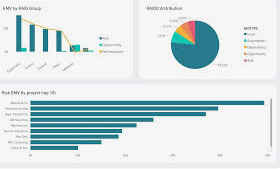
1) Executive portfolio overview
This dashboard should answer the question: what do I need to worry about?
It typically includes:
- total active projects and projects by category
- projects by status (green, amber, red)
- status trends over time (are we improving or deteriorating?)
- top projects at risk with short rationale
- decisions needed and by when
The key design rule is clarity. Executives want exceptions and trends, not detail.
2) Portfolio risk and issue view
This dashboard focuses on drivers of risk rather than just colour distribution. Useful elements include:
- top recurring risk categories (resourcing, vendors, dependencies, scope changes)
- issues by age (how long they have been open)
- risk exposure by category or programme
- items requiring escalation this week
This view supports proactive intervention. It is often more valuable than a simple RAG chart.
3) Milestone and schedule performance
Schedule reporting often becomes a debate because different teams define milestones differently. If you can standardise milestones at a high level, you can build a useful schedule dashboard showing:
- upcoming milestones over the next 4 to 8 weeks
- milestone slip trends
- projects with repeated milestone slippage
- dependencies linked to key milestones
This view helps leaders focus on what is coming rather than what already happened.
4) Capacity and overload view
Overload is one of the most common causes of late delivery. If you track project load by team or critical role, Power BI can help make overload visible. A simple capacity view can include:
- active projects by team or function
- projects by delivery phase (planning, execution, stabilisation)
- workload peaks based on upcoming milestones
- bottleneck indicators for scarce roles
You do not need perfect resource modelling. You need an honest picture of where delivery will slow.
5) Benefits and outcomes tracking
Benefits tracking is often missing from project dashboards because it is harder than schedule or status reporting. But it is where long-term value sits. A practical benefits view can include:
- projects with benefits on track, at risk, or unknown
- benefit categories (cost, risk reduction, customer, efficiency)
- follow-up review dates (30, 60, 90 days after handover)
Keep benefits reporting simple until adoption is stable.
How to make a dashboard trustworthy
Project dashboards become ignored when users do not trust the data. Trust is built through process and cadence more than visual design.
Define the update rhythm
Agree when project owners update their status and when the dashboard refresh occurs. If the dashboard is always a week behind reality, people will stop using it.
Standardise status definitions
Agree what green, amber, and red mean, and define triggers that move status. Require a short rationale and trend indicator.
Use exception-based governance
Dashboards are most valuable when they support exception management. Leadership meetings should focus on projects that are amber or red, and on the decisions needed to unblock them.
Assign ownership for data quality
Someone must own the portfolio data model and consistency. This does not need to be a large PMO. It can be a small central role responsible for standards and review.
Common mistakes when using Power BI for project management
Building visuals before fixing data consistency
If projects do not update consistently, your dashboard becomes a visual argument. Fix the minimum data set and update cadence first.
Trying to show everything in one report
One dashboard rarely serves everyone. Build role-based views. Keep executive views focused on exceptions and trends.
Turning dashboards into performance theatre
If teams fear being punished for amber status, the dashboard will become optimistic. Leaders must reward early transparency.
Relying on manual data entry and consolidation
If updates require too much admin, quality drops and people work around the system. Make updates lightweight and close to the work.
Where to learn a practical approach
Many teams start with a simple data model and evolve their reporting as maturity grows. An example of guidance on power bi for project management can be helpful when you want to understand how to structure reporting and dashboards in a way that supports real governance decisions.
A practical starting plan
If you want to get value quickly, focus on a short implementation plan:
- Week 1 – agree the minimum project data set, status definitions, and update cadence
- Week 2 – build an executive overview and a projects-at-risk view
- Week 3 – add milestone and capacity views based on the data you can reliably maintain
- Week 4 – run governance meetings using the dashboard, refine based on decisions made
Power BI becomes most valuable when it is used as the backbone of governance discussions. If leaders use it to decide what to stop, what to accelerate, and what to unblock, it becomes a decision tool rather than a reporting artifact.
